
 Kia Sportage: Audio system
NOTE
Metallic window tint may interfere with the Hi-Pass communication function, radio reception, connected car services and automatic headlight activation. The solution used to apply the tint may also seep into the vehicle and damage electronic equipment, so take care during installation.
Shark-fin antenna
 |
-
The shark-fin antenna transmits and receives signals such as AM/FM radio and GPS. Depending on the vehicle’s equipment, it may also handle additional signals.
NOTE
-
Check the Kia Sportage’s overall height before entering a low-clearance area, such as an automated parking facility or car wash, to avoid striking and damaging the antenna.
-
Take care not to hit the antenna when loading cargo onto the roof rack. Damage or obstruction may reduce its ability to transmit or receive signals.
USB port
 |
Use the USB port to connect a USB device.
WARNING
Mobile phone use
Do not use a mobile phone while driving. Stop the vehicle in a safe place before using one.
CAUTION
-
A USB device that is too large or has an unsuitable shape or length may become trapped if you close the tray cover. Forcing the cover shut can damage or deform the device, and forcing it open when the device is stuck can cause further damage. If the USB device does not fit comfortably, leave the cover open and use a device with a different size or shape.
-
When using communication equipment such as a mobile phone or radio inside the vehicle, fit a separate external antenna. Using this equipment with only its internal antenna may interfere with the vehicle’s electrical system and affect safe operation.
AI Assistant
 |
The Kia Sportage AI Assistant responds to voice commands and questions through the vehicle’s voice recognition system.
Operation
Press the AI Assistant button or say, “Hey, Kia,” to start a voice interaction.
-
Example: vehicle control
-
“Turn on the air conditioner.”
-
“Turn off the air conditioner.”
-
-
Example: asking a question
-
“Can you explain why the ocean is blue in a way that a 7-year-old can understand?”
-
NOTE
-
AI assistants may provide inaccurate information. Verify important details independently before relying on them.
-
AI Assistant availability may vary by language and region.
How the vehicle radio works
FM reception
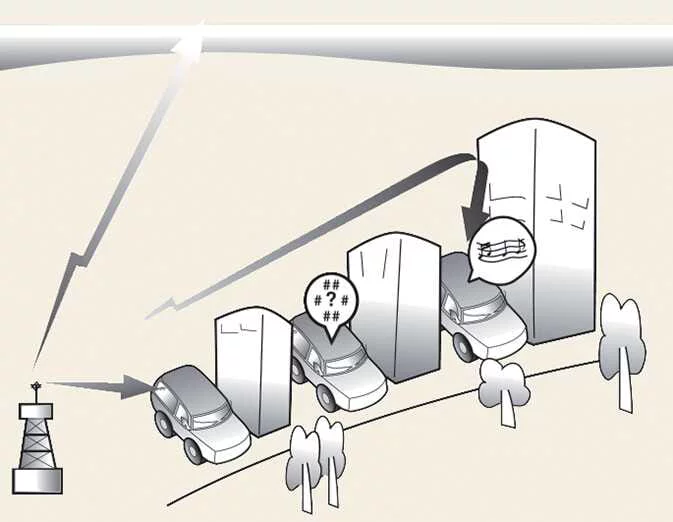 |
AM and FM stations transmit radio signals from towers around the area. The Kia Sportage antenna receives these signals, and the audio system processes them before sending sound to the vehicle’s speakers.
Reception may sometimes be weak or unclear. This can happen when the vehicle is far from a station, when another strong station is broadcasting nearby, or when buildings, bridges and other large obstacles interfere with the signal.
AM reception
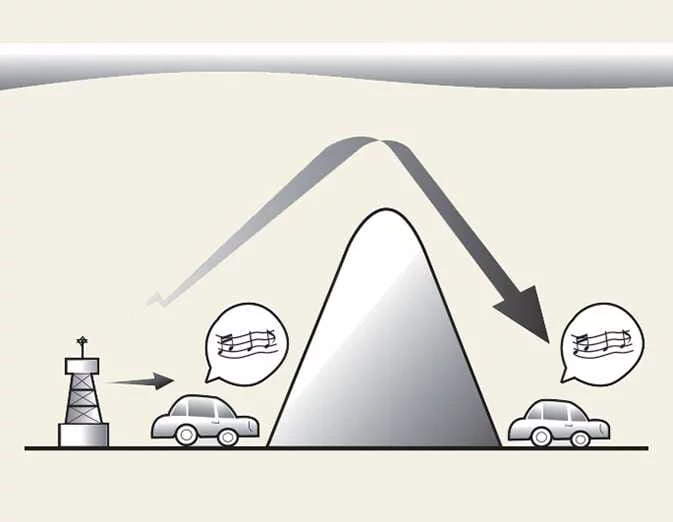 |
AM broadcasts can generally be received over greater distances than FM broadcasts because they use lower-frequency radio waves. These waves can follow the Earth’s curvature instead of travelling only in a straight line, and can bend around obstacles to provide broader signal coverage.
FM radio station
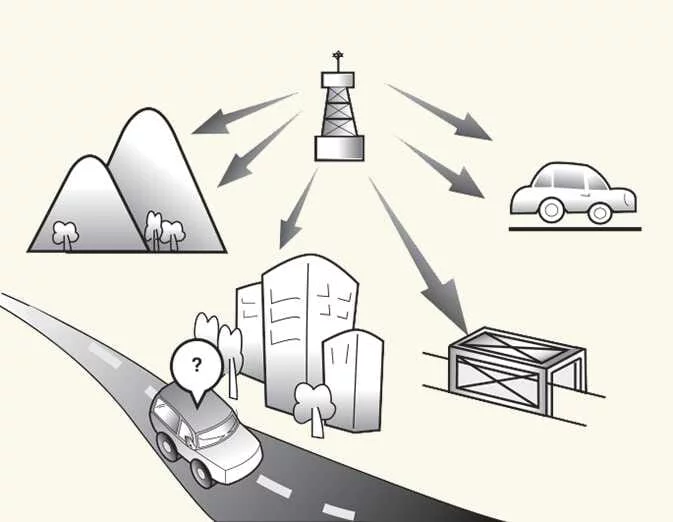 |
FM broadcasts use higher-frequency signals that do not follow the Earth’s surface. Reception may therefore weaken over a relatively short distance from the station. Buildings, mountains and other obstacles can also disrupt FM signals, causing changes in sound quality that may seem like a fault with the radio.
The following reception conditions are normal and do not necessarily indicate a problem with the Kia Sportage audio system:
-
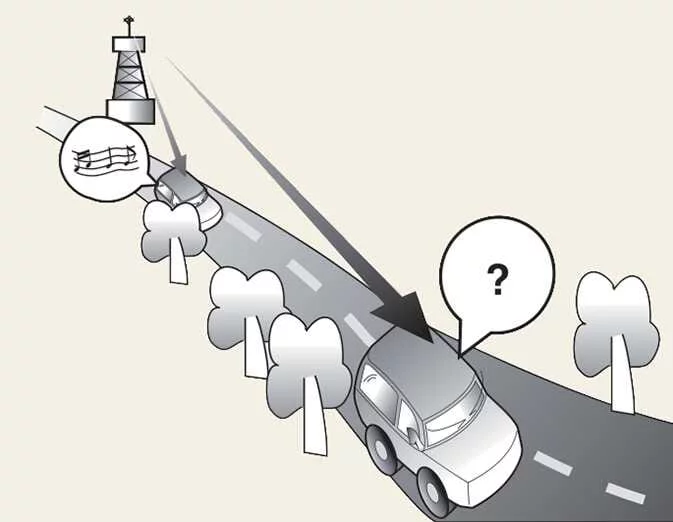
Fading: As the vehicle moves farther from a station, its signal may weaken and the sound may fade. When this happens, tune to another station with a stronger signal.
-
Flutter or static: A weak FM signal or a large obstruction between the transmitter and the vehicle can cause static or fluctuating sound. Lowering the treble may reduce the effect until reception improves.
-
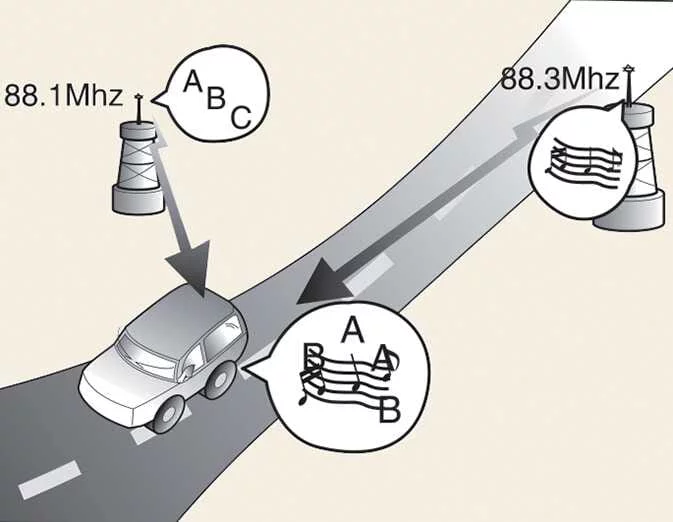
Station swapping: As one FM signal weakens, a stronger station broadcasting at a nearby frequency may become audible. The radio is designed to receive the clearest available signal. If this occurs, select a station with stronger reception.
-
Multi-path cancellation: Signals reaching the antenna from different directions can distort or interrupt reception. This may happen when a direct signal and a reflected signal from the same station arrive together, or when signals from two nearby frequencies overlap. Tune to another station until reception clears.
Using a mobile phone or two-way radio
A mobile phone used inside the Kia Sportage may cause noise through the audio system. This does not necessarily mean the audio equipment is faulty. Try using the mobile device as far from the audio equipment as possible.
CAUTION
Communication equipment, such as a mobile phone or radio, should be used in the vehicle with a separate external antenna installed. Using such equipment with only its internal antenna may interfere with the vehicle’s electrical system and affect safe operation.
WARNING
Mobile phone use
Do not use a mobile phone while driving. Stop in a safe location before using one.
 Over-The-Air software update: (if equipped)
 Welcome system: (if equipped). Illuminating functions. Dynamic Welcome Light
See also:
Owner maintenance precautions
Improper or incomplete service may result in problems. This section gives instructions
only for the maintenance items that are easy to perform.
As explained earlier in this section, several procedu ...
If you do decide to pull a trailer
Here are some important points if you decide to pull a trailer:
Consider using a sway control. You can ask a hitch dealer about sway control.
Do not do any towing with your car during its first ...
Automatic transmission: (if equipped)
Shift lever type: (if equipped)
Press the brake pedal and the
lock release button while moving the shift lever.
Press the unlock button ...
Categories
- Home
- Kia Sportage NQ5 (2022-2026) Owner's Manual
- Kia Sportage QL (2015-2019) Owner's Manual
- Kia Sportage QL (2015-2019) Service Manual
- Kia Sportage SL 2010-2016 Owner's Manual
- Kia Sportage SL 2010-2016 Service Manual
