
 Kia Sportage: Digital Key 2 (Card Key)
How to Register Digital Key 2 (Card Key)
To use a card as a Digital Key 2 for your Kia Sportage, register it in the vehicle system by following these steps.
-
Get into the vehicle with both smart keys.
-
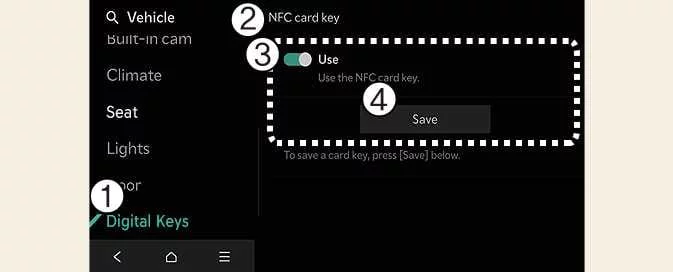
Check that the Use setting is enabled. With the vehicle switched on, select Setup > Vehicle > Digital Keys > NFC Card Key > Use on the infotainment system.
-
Digital Keys
-
NFC Card Key
-
Use
-
Save
-
-
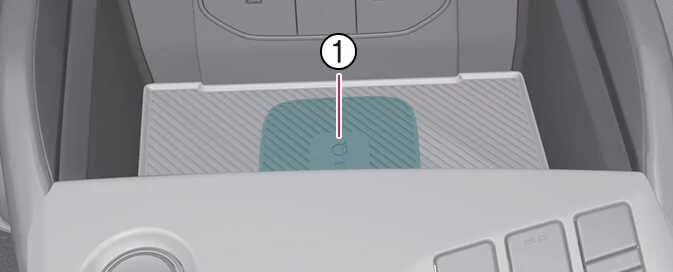
With the vehicle on, place the card key on the in-vehicle authentication pad and select Save on the infotainment system. Registration begins automatically.
-
Charging pad
-
-
When the card key has been saved, a confirmation message appears on the infotainment system screen.
TIP
-
The infotainment system menus may change after a software update. For current instructions, refer to the manual available in the infotainment system and the quick reference guide.
-
If a card key is already saved in the vehicle, the Save menu is unavailable. To register a card key again, first follow the deletion procedure under How to Delete Digital Key 2 (Card Key).
-
Both smart keys must be inside the vehicle when you register a Digital Key 2 card key.
-
A registered card key can be used only with the vehicle for which it was registered.
How to Use Digital Key 2 (Card Key)
Card Key Touch Control
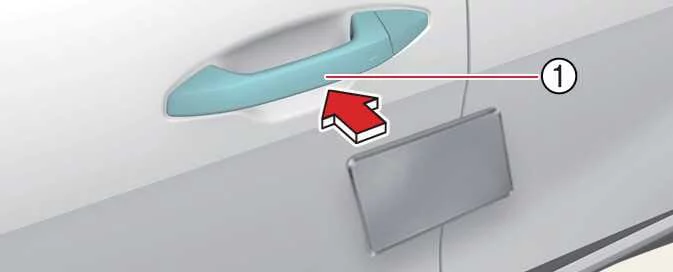
Touch the registered card key to the door handle to lock or unlock the Kia Sportage. To start the vehicle, place the card key on the in-vehicle authentication pad, which is the wireless charging pad.
 |
|
Locking and Unlocking the Doors
-
Hold the registered card key against the authentication pad (1) on the driver’s or front passenger’s door handle for more than two seconds to lock or unlock the door.
-
After locking the door, check that it is secure. After unlocking, the doors lock again automatically after 30 seconds unless a door is opened.
-
For the system to respond, align the centre of the NFC card key with the NFC authentication area on the vehicle’s door handle.
NOTE
The doors will not lock, and a chime may sound, if you try to lock the vehicle with the card key while any of the following conditions apply:
-
The smart key is inside the vehicle.
-
The vehicle is in the
ACCorONposition. -
One or more doors, the bonnet or the tailgate is open.
Starting the Vehicle
Place your registered Digital Key 2 card on the in-vehicle authentication pad (wireless charging pad). Press the brake pedal, then press the ignition switch or ENGINE START/STOP button to start the Kia Sportage.
-
After the vehicle has started, you can remove the card key from the pad.
WARNING
The vehicle can be started when the registered card key is on the in-vehicle authentication pad. Do not leave children or anyone unfamiliar with the system unsupervised in the vehicle, as this could result in serious injury or death. Take the registered card key with you when leaving the vehicle to help prevent theft.
CAUTION
-
Digital Key 2 may not work if:
-
The card key is not correctly aligned with the centre of the door handle or in-vehicle authentication pad.
-
The card key is placed on the pad together with another NFC-enabled card, such as a credit card, or a smartphone.
-
The card is not being detected. Move it approximately 10 cm (4 inches) away from the authentication pad, then touch it to the pad again.
-
-
An impact can damage the card key. If it is damaged, replace it with a new card and register the replacement.
-
The card key is a consumable item and is not covered by warranty repair. After-sales service is not available for a card that is damaged or lost through customer negligence.
-
Prolonged exposure to high temperatures may cause the card key to malfunction. Do not leave it in direct sunlight or expose it to excessive heat.
-
Do not leave the card key on the in-vehicle authentication pad while driving, as this may cause it to malfunction. After starting the vehicle, remove the card from the pad.
-
Do not place the card key between the in-vehicle authentication pad and a smartphone while wirelessly charging the phone. For example, the card may malfunction if it is attached to the back of the phone case. Remove the card key from the smartphone before charging it.
How to Delete Digital Key 2 (Card Key)
-
Start the vehicle with the smart key and keep the smart key inside the Kia Sportage throughout the card key deletion process.
-
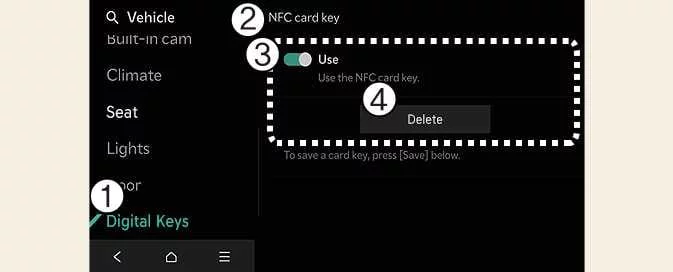
With the vehicle switched on, select Setup > Vehicle > Digital Key > NFC Card Key > Delete on the infotainment system. Delete is unavailable if no card key is saved.
-
Digital Key
-
NFC Card Key
-
Use
-
Delete
-
-
When the card key has been deleted, a confirmation message appears on the infotainment system screen or in the instrument cluster.
TIP
The infotainment system menus may change after a software update. For current instructions, refer to the manual available in the infotainment system and the quick reference guide.
 How to Delete a Digital Key (Smartphone)
 Personalized Profile and Vehicle Settings
See also:
Larger children
Children who are too large for child restraint systems should always occupy the
rear seat and use the available lap/shoulder belts. The lap portion should be fastened
and snugged on the hips and a ...
Components and Components Location
Component Location Index
Engine Room
1. Condenser2. Receiver-drier 3. Compressor 4. Expansion Valve5. Service port (High)6. Service port (Low)7. A/C Pressure Transducer
Interior
...
Troubleshooting
Troubleshooting
Trouble symptomSuspect areaRemedy Shift delayBreakdown of clutch or brakeFaulty hydraulic controlFaulty hydraulic supply???Clutch, BrakeSolenoid valve, Valve bodyMechanical o ...
Categories
- Home
- Kia Sportage NQ5 (2022-2026) Owner's Manual
- Kia Sportage QL (2015-2019) Owner's Manual
- Kia Sportage QL (2015-2019) Service Manual
- Kia Sportage SL 2010-2016 Owner's Manual
- Kia Sportage SL 2010-2016 Service Manual
