
 Kia Sportage: How to Use Digital Key 2 (Smartphone)
Smartphone Touch Control
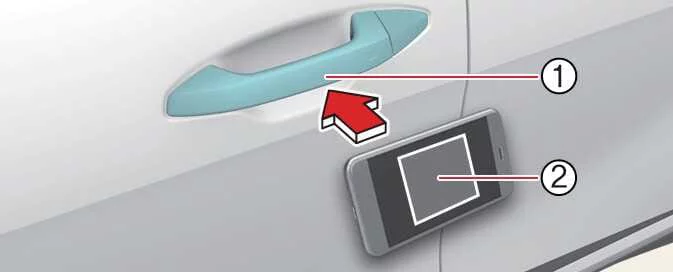
With Digital Key 2, you can lock or unlock the Kia Sportage by touching your smartphone to the door handle; you do not need to open the Kia App or Kia Connect app. You can also start the vehicle by placing the smartphone on the in-vehicle authentication pad, which is the wireless charging pad.
 |
|
NOTE
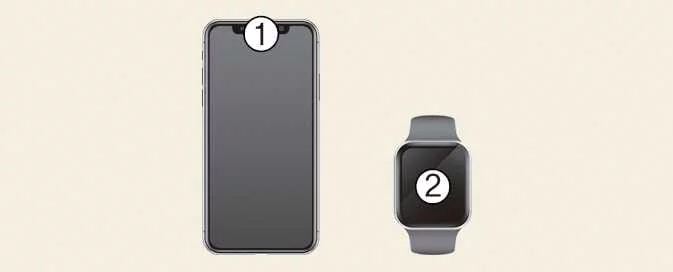
On a Samsung smartphone, you can check the NFC antenna location in Settings > Connections > NFC and contactless payments. On an Apple iPhone, the NFC antenna is at the top of the back of the device; on an Apple Watch, it is in the centre of the screen. Position the smartphone’s NFC antenna against the in-vehicle authentication pad (wireless charging pad).
 |
The NFC antenna location can vary between smartphone models. Contact the phone manufacturer if you need help locating it.
Locking and Unlocking the Doors
-
Touch the NFC antenna on your smartphone to the authentication pad on the driver’s or front passenger’s door handle for more than two seconds to lock or unlock the door.
-
If 2 Press Unlock is enabled, touching the smartphone to the driver’s door handle unlocks only the driver’s door. Touch the handle again within four seconds to unlock all doors.
-
After the doors are unlocked, they lock again automatically after 30 seconds unless you open a door.
-
If the smartphone digital key does not respond, move the phone at least 0.1 m (4 inches) away from the door handle authentication pad, then try again.
Smartphones Without UWB Support
To lock or unlock the doors with a registered smartphone, hold the NFC antenna on the back of the phone against the authentication pad on the driver’s or front passenger’s exterior door handle for approximately two seconds.
Smartphones with UWB Support
-
Carry the smartphone with you and touch the lock/unlock sensor, the marked area on the exterior door handle, to lock or unlock the doors.
WARNING
-
If the smartphone is in a back pocket or bag, your body may block its signal. This can weaken the Bluetooth connection and delay door locking, unlocking or vehicle starting.
-
Digital Key 2 may not work correctly if the vehicle has window tinting film that contains metal.
NOTE
When using Digital Key 2, the doors may unlock and a beep may sound in any of these situations:
-
The smart key is inside the vehicle.
-
The vehicle is in the
ACCorONposition. -
You try to lock the doors while more than one door, the bonnet or the tailgate is open.
-
The vehicle has window tinting film containing metal, which may interfere with Digital Key 2 operation.
Starting the Vehicle
Place your registered smartphone on the in-vehicle authentication pad (wireless charging pad), press the brake pedal and start the Kia Sportage.
-
After the vehicle has started, you can remove the smartphone from the pad.
Smartphones Without UWB Support
-
Place the smartphone’s NFC antenna in the centre of the in-vehicle authentication pad (wireless charging pad). Press the brake pedal, then press the start button to start the vehicle.
-
Once the Kia Sportage has started, you can remove the phone from the authentication pad.
-
Some smartphones may not communicate smoothly through NFC because of their internal design. If the phone is not detected, move it slightly to the left or right on the authentication pad.
-
The iPhone’s NFC antenna is at the top of the back of the device, while the Apple Watch antenna is in the centre of the screen. Make sure the antenna touches the in-vehicle authentication pad. Antenna positions vary between smartphone models; contact the phone manufacturer for details.
Smartphones with UWB Support
-
Carry the smartphone inside the vehicle, press the brake pedal and then press the start button.
-
To start the Kia Sportage remotely, use the Kia app or an app provided by the smartphone manufacturer and press its remote start button. The vehicle starts and the hazard warning lights flash.
-
To switch off the vehicle, press the remote start button again.
Operating the Tailgate
Smartphones with UWB Support
-
When the vehicle is locked, carry your registered smartphone and press the tailgate open button to open the tailgate.
-
If Smart Tailgate is enabled, the tailgate opens automatically when you stand in its detection area for more than three seconds while carrying a smartphone registered with Digital Key 2.
CAUTION
-
Before closing the tailgate, check that the registered smartphone is inside the vehicle. If the phone is left inside, the doors may not unlock when you close the tailgate while the doors are locked or when you use the tailgate close button.
-
Anyone may be able to start the vehicle if a registered smartphone is left inside. Do not leave children or anyone unfamiliar with the system alone in the Kia Sportage; doing so could result in serious injury or death. Always take your registered smartphone with you when leaving the vehicle to help prevent theft.
For smartphones with UWB support, Digital Key 2 is available only while the vehicle and smartphone are connected through Bluetooth.
-
The effective Bluetooth range may vary with the surrounding environment.
-
If the smartphone is in a back pocket or bag, your body may block its signal, weakening the Bluetooth connection and delaying door locking, unlocking or vehicle starting.
For smartphones with UWB support, Digital Key 2 is available for a limited time to help optimise the vehicle and smartphone batteries.
You can check the connection between the vehicle and smartphone in the phone’s settings or through an app provided by the smartphone manufacturer.
WARNING
The Kia Sportage can be started when a registered smartphone is placed on the in-vehicle authentication pad (wireless charging pad). Do not leave children or anyone unfamiliar with the system unsupervised in the vehicle, as this could result in serious injury or death. Take the registered smartphone with you whenever you leave the vehicle to help prevent theft.
NOTE
The first use of Digital Key 2 by a shared user may take longer than usual.
Hold the Digital Key 2 smartphone against the authentication pad on the exterior door handle until the door lock or unlock function operates.
The vehicle may not start using the in-vehicle authentication pad the first time it is used.
 How to Register Digital Key 2 (Smartphone)
 How to Delete a Digital Key (Smartphone)
See also:
Parking Collision-Avoidance Assist (PCA): If Equipped
At low speeds, Parking Collision-Avoidance Assist detects pedestrians or objects behind the Kia Sportage. If the
system identifies a risk of collision, it may warn you and assist with braking to he ...
Seat belt warning (for driver’s seat)
As a reminder to the driver, the seat belt warning light will blink for approximately
6 seconds each time you turn the ignition switch ON regardless of belt fastening.
If the driver's seat be ...
Purge Control Solenoid Valve (PCSV): Description and Operation
Description
Purge Control Solenoid Valve (PCSV) is installed on the surge
tank and controls the passage between the canister and the intake
manifold. It is a solenoid valve and is open when the ...
Categories
- Home
- Kia Sportage NQ5 (2022-2026) Owner's Manual
- Kia Sportage QL (2015-2019) Owner's Manual
- Kia Sportage QL (2015-2019) Service Manual
- Kia Sportage SL 2010-2016 Owner's Manual
- Kia Sportage SL 2010-2016 Service Manual
