
 Kia Sportage: Manual Speed Limit Assist (MSLA). Manual Speed Limit Assist operation
 |
|
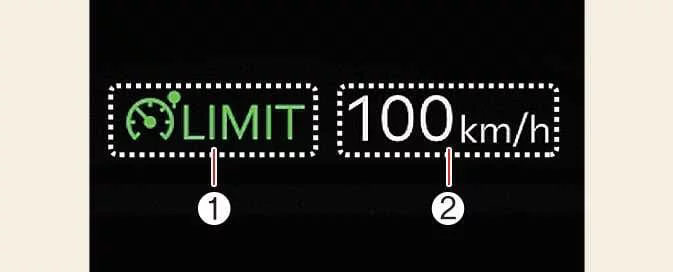
Manual Speed Limit Assist lets you set a maximum speed for the Kia Sportage when you want to avoid driving above a chosen limit.
If you accelerate beyond the set limit, the displayed speed flashes and an audible alert sounds. These alerts continue until the vehicle returns to or below the selected speed.
Manual Speed Limit Assist operation
Setting the speed limit
-
At the speed you want to set, press and hold the Driving Assist button (
 ). The Speed Limit indicator
(
). The Speed Limit indicator
( ) appears on the instrument cluster.
-
Move the (+) switch up or the (−) switch down, then release it when the desired speed is displayed. Each brief operation changes the set speed by 1 km/h (1 mph).
To adjust the speed in larger increments, move and hold the (+) or (−) switch. The set speed changes in increments of 10 km/h (5 mph).
-
The selected speed limit is shown on the instrument cluster. If you need to drive faster than the set limit, press the accelerator pedal.
While the vehicle is travelling above the limit, the set speed flashes and an audible alert sounds. The alerts stop when the vehicle speed returns to the set limit or below it.
NOTE
To exceed the set limit, press the accelerator pedal firmly until the kickdown function activates.
Temporarily pausing Manual Speed Limit Assist
 |
Press the pause switch ( ) to suspend the active speed
limit temporarily. The set speed disappears, but the Speed Limit indicator (
) to suspend the active speed
limit temporarily. The set speed disappears, but the Speed Limit indicator ( ) remains illuminated.
Resuming Manual Speed Limit Assist
 |
After pausing MSLA, use the (+), (−) or resume switch ( ) to activate it again.
Move the (+) switch up or the (−) switch down to set the limit to the current speed shown on the instrument cluster.
Press the resume switch ( ) to return to the
previously selected speed limit.
) to return to the
previously selected speed limit.
Turning off Manual Speed Limit Assist
 |
Press the Driving Assist button ( ) to
switch off MSLA. The Speed Limit indicator (
) to
switch off MSLA. The Speed Limit indicator ( ) goes out.
WARNING
Observe these precautions whenever you use Manual Speed Limit Assist:
-
Set the limit below the speed limit that applies in your country or region.
-
When you are not using MSLA, switch it off to prevent setting a speed unintentionally. Check that the Speed Limit indicator (
 ) is
off.
) is
off. -
MSLA does not replace safe, attentive driving. You remain responsible for controlling the vehicle and responding to sudden or unexpected situations. Pay close attention to the road and traffic conditions at all times.
 Blind-Spot View Monitor (BVM): (if equipped)
 Intelligent Speed Limit Assist (ISLA): (if equipped)
See also:
Sunglass holder
To open the sunglass holder, press the cover and the holder will slowly open.
Place your sunglasses with the lenses facing out. To close the sunglass holder,
push it up.
WARNING - Sunglass ...
Snowy or icy conditions
To drive your vehicle in deep snow, it may be necessary to use snow tires on
your tires. If snow tires are needed, it is necessary to select tires equivalent
in size and type of the original equip ...
Checking the engine oil level
1.Be sure the vehicle is on level ground.
2.Start the engine and allow it to reach normal operating temperature.
3.Turn the engine off and wait for a few minutes (about 5 minutes) for the oil
to r ...
Categories
- Home
- Kia Sportage NQ5 (2022-2026) Owner's Manual
- Kia Sportage QL (2015-2019) Owner's Manual
- Kia Sportage QL (2015-2019) Service Manual
- Kia Sportage SL 2010-2016 Owner's Manual
- Kia Sportage SL 2010-2016 Service Manual
