
 Kia Sportage: High Beam Assist (HBA): (if equipped)
|
|
|
|
|
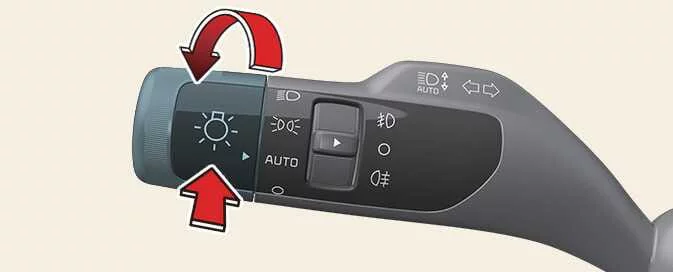
High Beam Assist automatically changes the headlight range between high and low beam according to the brightness of detected vehicles and certain road conditions.
Detecting sensor
Refer to “Detecting sensor(s)” for information about the applicable sensors and their locations.
CAUTION
Keep the front view camera in good condition so High Beam Assist can operate effectively.
For precautions relating to the front view camera, refer to “Forward Collision-Avoidance Assist (FCA) (Sensor Fusion).”
High Beam Assist settings
|
|
With the vehicle in the ON position, select Lights > High Beam Assist in the Settings menu to enable
the function.
WARNING
For safety, adjust the settings only after parking the vehicle in a safe location.
High Beam Assist operation
High Beam Assist display and controls
-
After you select HBA (High Beam Assist) in the Settings menu, the system operates as follows:
-
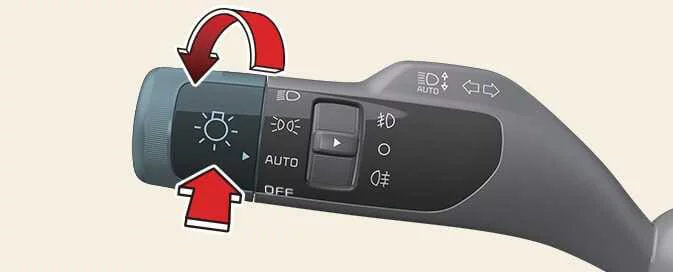
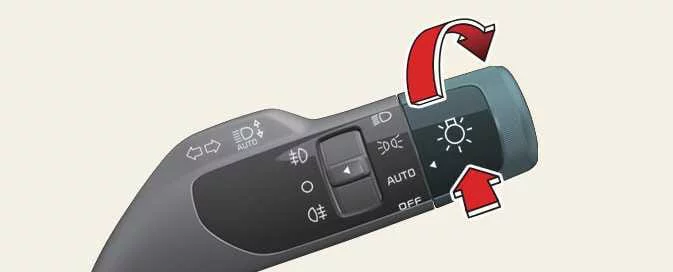
Set the headlight switch to
AUTOand push the headlight lever away from you, towards the instrument cluster. The High Beam Assist indicator appears on the cluster to show that
the function is enabled.
appears on the cluster to show that
the function is enabled. -
When enabled, the high beams switch on at vehicle speeds above 30 km/h (20 mph). They do not switch on below 20 km/h (12 mph). When the high beams are on, the High Beam indicator
 appears on the cluster.
-
-
While High Beam Assist is operating, using the headlight lever or switch changes the system as follows:
-
If the high beams are off, pulling the lever towards you switches them on temporarily. When you release the lever, High Beam Assist resumes.
-
If the high beams are on, pulling the lever towards you switches to low beam and cancels High Beam Assist.
-
Pushing the light lever towards the instrument cluster switches on the high beams and disengages High Beam Assist.
-
Moving the headlight switch from
AUTOto another setting—headlight, position lamp or off—turns off High Beam Assist and activates the selected lighting setting.
-
-
When High Beam Assist is active, it switches from high beam to low beam if any of these conditions is detected:
-
The headlights of an oncoming vehicle are detected.
-
The tail lamps of a vehicle ahead are detected.
-
The headlight or tail lamp of a motorcycle or bicycle is detected.
-
Ambient light is bright enough that high beams are not needed.
-
Streetlights or other lights are detected.
-
The lighting switch is no longer in the
AUTOposition. -
High Beam Assist has been switched off.
-
The vehicle speed drops to 35 km/h or lower.
-
High Beam Assist malfunction and limitations
High Beam Assist malfunction
|
A: Check driver assistance system |
If High Beam Assist does not operate correctly, a warning message and warning light  appear on the instrument cluster. Have the system inspected by an
authorised Kia dealer or service partner.
appear on the instrument cluster. Have the system inspected by an
authorised Kia dealer or service partner.
TIP
You can also view this warning in the service messages within the cluster’s Utility information view.
High Beam Assist limitations
High Beam Assist may not detect another vehicle or may not respond as expected in situations such as these:
-
A vehicle’s light cannot be seen because its lamp is damaged, obscured or otherwise out of view.
-
A vehicle’s headlights are covered with dust, snow or water.
-
A vehicle’s headlights are off while its fog lights are on.
-
A lamp ahead has a shape similar to a vehicle lamp.
-
Headlights are damaged or have not been repaired correctly.
-
Headlights are aimed incorrectly.
-
You are driving on a narrow or winding road, a rough surface, or an uphill or downhill section.
-
A vehicle ahead is only partly visible at an intersection or on a curved road.
-
A traffic light, reflective sign, flashing sign or mirror is ahead.
-
A temporary reflector or flashing light is present, such as at a roadworks site.
-
The road is wet, icy or covered with snow.
-
A vehicle suddenly comes into view around a bend.
-
The Kia Sportage is tilted because of a flat tyre or is being towed.
-
Smoke, exhaust fumes, fog, snow or similar conditions prevent the system from detecting a vehicle’s lights.
NOTE
-
Depending on the instrument cluster specification or selected theme, warning images and colours may look different.
-
For further information about front view camera limitations, refer to “Forward Collision-Avoidance Assist (FCA) (Sensor Fusion).”
WARNING
-
High Beam Assist may not operate correctly in every situation. It is a driver aid for convenience; you remain responsible for safe driving and must always check the road and traffic conditions.
-
If High Beam Assist does not work normally, switch between high and low beam manually.
 Lighting controls
 Intelligent Front-Lighting System (IFS): (if equipped)
See also:
Front Door: Components and Components Location
Components
1. Front door trim2. Front door inside handle cap3. Front door trim seal4. Front door quadrant inner cover5. Front door module6. Front door panel7. Front door belt outside moulding8. ...
Weight of the trailer tongue
The tongue load of any trailer is an important weight to measure because it affects
the total gross vehicle weight (GVW) of your vehicle. This weight includes the curb
weight of the vehicle, any ...
Overview. Detecting sensor(s)
Detecting sensor(s)
Figure 1. Front view
Figure 2. Front view (GT-Line): if equipped
Figure 3. Rear view
Figure 4. Rear view (GT-Line): if equipped
Use the illustrations above to identify ...
Categories
- Home
- Kia Sportage NQ5 (2022-2026) Owner's Manual
- Kia Sportage QL (2015-2019) Owner's Manual
- Kia Sportage QL (2015-2019) Service Manual
- Kia Sportage SL 2010-2016 Owner's Manual
- Kia Sportage SL 2010-2016 Service Manual
