
 Kia Sportage: Intelligent Front-Lighting System (IFS): (if equipped)
The Intelligent Front-Lighting System helps maintain a clear view at night while the high beams are in use by adjusting the beam in response to detected traffic.
Intelligent Front-Lighting System settings
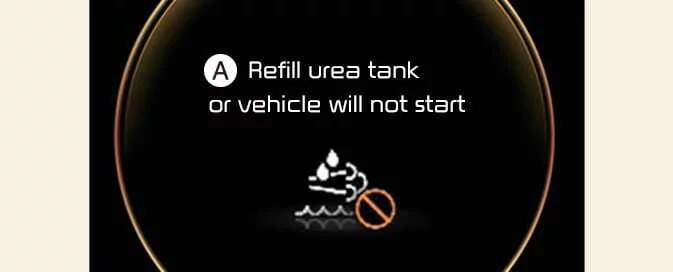
|
|
With the vehicle in the ON position, select Lights > Intelligent front-lighting in the Settings menu
to enable the system. Deselect this setting to turn it off.
WARNING
For safety, change the settings only after parking the Kia Sportage in a safe place.
Intelligent Front-Lighting System operation
Display and controls
|
Figure 1. Type A 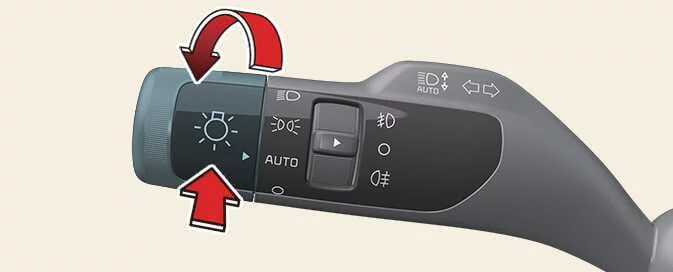
|
|
|
Figure 2. Type B 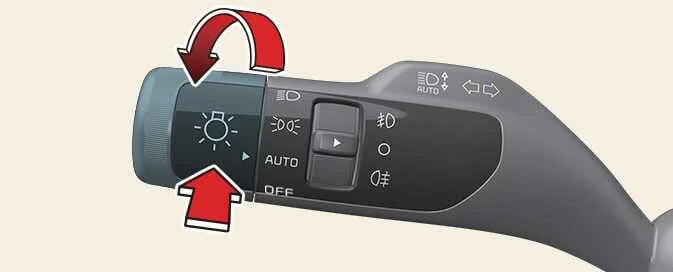
|
|
|
Figure 3. Type C 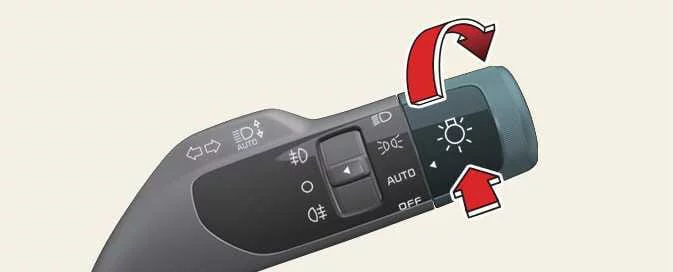
|
To use the Intelligent Front-Lighting System, follow these steps:
-
Set the headlight switch to
AUTOand push the headlight lever towards the instrument cluster. The Intelligent Front-Lighting System indicator appears on the cluster to show that the system
is enabled.
appears on the cluster to show that the system
is enabled. -
When enabled, the system operates according to the speed setting selected in the infotainment system. The initial setting activates it when the vehicle travels faster than 40 km/h (25 mph).
-
If the front view camera detects an oncoming vehicle or a vehicle ahead, part of the high-beam LED output is switched off.
-
At higher speeds, approximately above 100 km/h (60 mph), if the system detects an oncoming vehicle or a vehicle ahead, the driver-side headlight switches off while the system controls only the passenger-side headlight.
Intelligent Front-Lighting System malfunction and limitations
Intelligent Front-Lighting System malfunction
|
A: Check Intelligent Front-Lighting System (IFS) |
If the Intelligent Front-Lighting System does not operate correctly, a warning message appears on the instrument cluster for several seconds. The AFS warning light then illuminates. Have the Kia Sportage inspected by an authorised Kia dealer or service partner.
|
A: Intelligent Front-Lighting System (IFS) disabled. Camera obscured |
Dirt, snow or debris covering the front view camera may temporarily prevent the Intelligent Front-Lighting System from working properly. If this happens, a warning message appears on the cluster.
Once the obstruction has been removed, the system should resume normal operation.
The system may also work incorrectly in areas with few or no detectable vehicles or objects, such as open terrain, after the vehicle is started.
A warning message does not always appear when the Intelligent Front-Lighting System is not operating properly.
Intelligent Front-Lighting System limitations
The system may not work as intended in situations such as the following:
-
A vehicle’s light cannot be detected because the lamp is damaged, hidden or otherwise out of view.
-
A vehicle’s headlight is covered with dust, snow or water.
-
A lamp ahead has a shape similar to a vehicle’s lamp.
-
A vehicle’s headlights are off while its fog lights are on.
-
Headlights are damaged or have not been repaired correctly.
-
Headlights are aimed incorrectly.
-
You are driving on a narrow or winding road, a rough road, or an uphill or downhill section.
-
A vehicle ahead is only partly visible at an intersection or on a curved road.
-
A traffic light, reflective sign, flashing sign or mirror is ahead.
-
A temporary reflector or flashing light is present, such as at a road construction site.
-
The road is wet, icy or covered with snow.
-
A vehicle suddenly appears from around a bend.
-
The vehicle is tilted because of a flat tyre or is being towed.
-
There are many streetlights or the surrounding area is already bright.
-
Smoke, exhaust fumes, fog, snow or similar conditions prevent the system from detecting a vehicle’s lights.
-
The windscreen is covered with a foreign substance.
 High Beam Assist (HBA): (if equipped)
 Headlamp levelling adjustment switch
See also:
Description and Operation
Operation
Function Of Safety Power Window
When all door (Front, Rear) power window auto-up switch is operated, safety function is activated.
1.
Safety function condition
When detect the force o ...
Tyre rotation. Wheel alignment and tyre balance
Tyre rotation
Figure 1. With a full-size spare tyre
Figure 2. Without a spare tyre
...
Fuses
A vehicle’s electrical system is protected from electrical overload damage by
fuses.
This vehicle has 3 fuse panels, one located in the driver’s side panel bolster,
the other in the engine ...
Categories
- Home
- Kia Sportage NQ5 (2022-2026) Owner's Manual
- Kia Sportage QL (2015-2019) Owner's Manual
- Kia Sportage QL (2015-2019) Service Manual
- Kia Sportage SL 2010-2016 Owner's Manual
- Kia Sportage SL 2010-2016 Service Manual
