
 Kia Sportage: How to Register Digital Key 2 (Smartphone)
Kia Digital Key 2 works only with smartphones that support the feature. Smartphone compatibility and the digital key service are provided by the smartphone manufacturer, and some functions may not be available depending on the services supported by your vehicle.
While the Digital Key 2 controller is being updated, the smart key may temporarily stop working. During this time, you can still use the smart key’s door lock and unlock buttons.
Set Up Your Smartphone
To use Digital Key 2 with a smartphone, install the Kia App or Kia Connect app, register your information and subscribe to the service.
Register a Smartphone
 |
|
-
Start the Kia Sportage using the smart key. Keep the smart key inside the vehicle throughout the digital key registration process.
-
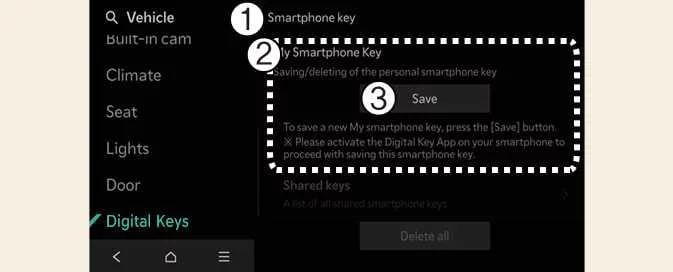
Shift the vehicle into P (Park). In the Kia App or Kia Connect app, select Register Vehicle Digital Key Setting, then follow the instructions shown in the app.
-
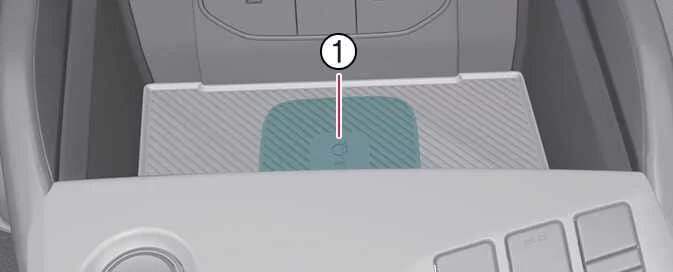
If your smartphone does not support UWB, place its NFC antenna in the centre of the in-vehicle authentication pad, which is the wireless charging pad (1).
-
Charging pad
-
-
If your smartphone supports UWB, you can register the digital key wirelessly while carrying the phone in the vehicle; you do not need to place it on the in-vehicle authentication pad (wireless charging pad) (1).
-
-
When the smartphone digital key has been saved, a confirmation message appears in the instrument cluster or on the infotainment system screen.
TIP
-
The infotainment system may look different after a software update. For current instructions, refer to the manual in the infotainment system and the quick reference guide.
-
Vehicle
If a Digital Key 2 smartphone key is already saved in the vehicle, the Smartphone Key menu on the infotainment system displays Delete All, and the My Smartphone Key screen displays Delete. To save a key again, first follow the instructions in How to Delete a Digital Key (Smartphone).
-
Smartphone
You cannot save the vehicle’s digital key again while it remains stored in the owner’s smartphone. Delete the key from the smartphone manufacturer’s wallet app or from the vehicle before registering it again.
-
The Digital Key 2 registration process is cancelled if any of the following occurs:
-
The smartphone is removed from the in-vehicle authentication pad (wireless charging pad).
-
You change the infotainment system or instrument cluster screen.
-
The vehicle is switched off.
-
The gear is shifted out of its current position.
-
The smart key is not present. In this case, the registration process will not start.
-
-
The in-vehicle authentication pad may not detect some smartphones reliably because their internal components are arranged differently. If registration does not proceed, move the smartphone slightly to the left or right on the wireless charging pad.
-
UWB (Ultra Wide Band) is a wireless communication technology that uses an ultra-wide frequency band. NFC (Near Field Communication) is a short-range wireless communication technology.
If Registration Does Not Start in the Kia App or Kia Connect App
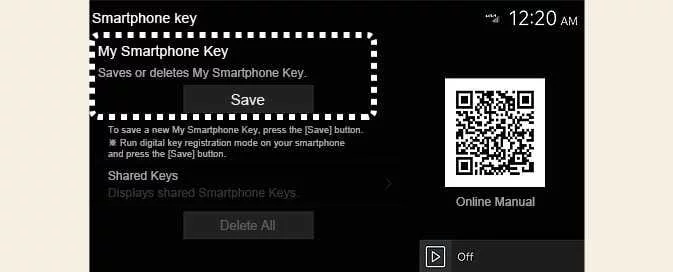
If the infotainment system does not display “Registering...” when you place your smartphone on the in-vehicle authentication pad, try the manual registration procedure below.
-
Switch the Kia Sportage off. Use the smart key to switch the vehicle on again, and keep the smart key inside the vehicle.
-
With the vehicle in P (Park), select Setup > Vehicle > Digital Keys > Smartphone Key > My Smartphone Key on the infotainment system screen.
-
Place the NFC antenna of the smartphone in the centre of the in-vehicle authentication pad (wireless charging pad).
When the smartphone digital key has been saved, a confirmation message appears on the infotainment system screen.
 Digital Key 2 (Smartphone)
 How to Use Digital Key 2 (Smartphone)
See also:
Components and Components Location
Component Location
1. Slide motor2. Rear height motor3. Reclining motor4. Power seat switch5. Reclining switch6. Lumbar support switch7. Lumbar support motor
...
Specifications
Specifications
Ignition System
ItemsSpecificationsIgnition coilPrimary resistance0.62 ± 10 % (?)Secondary resistance7.0 ± 15 % (k?)Spark plugsTypeZXU20HCR8Gap0.7 ~0.8 mm (0.0276 ~ 0.0315 in.)
...
ICM (Integrated Circuit Module) Relay Box: Schematic Diagrams
Schematic Diagram
...
Categories
- Home
- Kia Sportage NQ5 (2022-2026) Owner's Manual
- Kia Sportage QL (2015-2019) Owner's Manual
- Kia Sportage QL (2015-2019) Service Manual
- Kia Sportage SL 2010-2016 Owner's Manual
- Kia Sportage SL 2010-2016 Service Manual
