
 Kia Sportage: Rear View
 |
|
 |
|
 |
The rear-view function of the Kia Sportage Surround View Monitor shows the area behind the vehicle on the navigation system screen. The displayed view follows the driver’s selection and can assist when parking or manoeuvring.
Parking
While parking, the Surround View Monitor rear view is activated under either of these conditions:
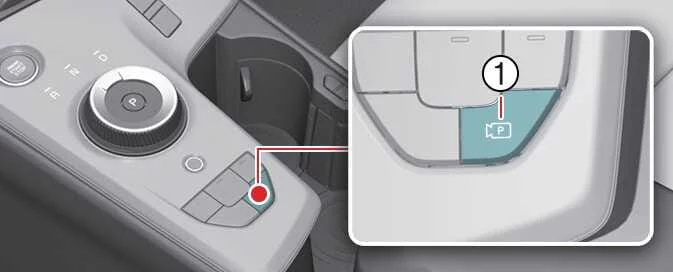
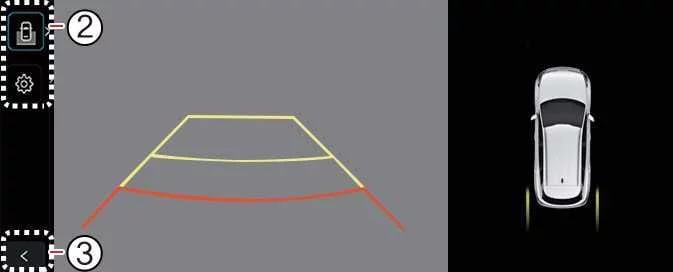
- The gear is in P (Park), N (Neutral), or D (Drive), the vehicle is travelling below 10 km/h (6 mph), and you press the Parking/View button (1), then use the view switching button (2) to select the rear view.
- The gear is shifted to R (Reverse).
Use the view switching button (2) on the Surround View Monitor to choose the rear view, rear top view, rear side view, or rear wide view.
While the vehicle is in P (Park), N (Neutral), or D (Drive), the rear-view function turns off under any of the following conditions:
- The gear is shifted from N (Neutral) or D (Drive) to P (Park).
- The Parking/View button (1) is pressed.
- The back button (3) on the Surround View Monitor screen is pressed.
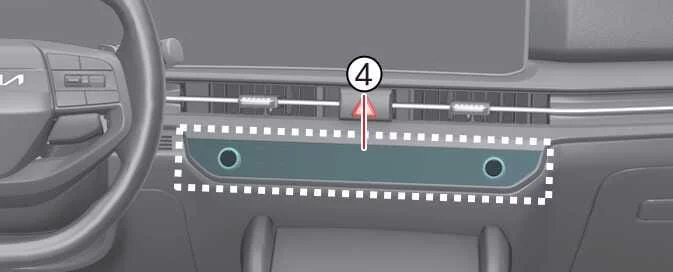
- The infotainment system power button (4) is pressed.
- The vehicle travels faster than 10 km/h (6 mph).
When the gear is in R (Reverse), the rear-view function turns off under the following condition:
- The gear is shifted to P (Park).
NOTE
- When the rear view is switched on, the monitor displays the view mode used most recently.
- In R (Reverse), pressing the infotainment system power button (4) does not turn off the video display.
Driving
While driving, the Surround View Monitor rear view can be activated under the following condition:
- The gear is in N (Neutral) or D (Drive), the vehicle is travelling faster than 10 km/h (6 mph), and you press the Parking/View button (1), then use the view switching button (2) to select the rear view.
Use the view switching button (2) on the Surround View Monitor to select the rear view or rear wide view.
While driving, the rear-view function turns off under any of the following conditions:
- The gear is shifted to P (Park).
- The Parking/View button (1) is pressed.
- The back button (3) on the Surround View Monitor screen is pressed.
- The infotainment system power button (4) is pressed.
NOTE
- When the rear view is switched on while driving, the monitor displays the view mode used most recently.
- Rear parking guidelines are not displayed in the rear view while driving.
- If the front view is activated while driving, it remains displayed even if the vehicle slows to below 10 km/h (6 mph).
- When the front view is activated while driving, the front top view and front side view are unavailable at all speeds.
 Parking/View Button. Front View
 3D View Function
See also:
Rear seat adjustment
Seatback angle
To recline the seatback:
1. Pull up the seatback lever.
2. Hold the lever and adjust the seatback to the position you desire.
3. Release the lever and make sure the seatback is lo ...
Transaxle Oil Temperature Sensor: Description and Operation
Description
Transaxle oil temperature sensor monitors the automatic
transaxle fluid''s temperature and conveys the readings to TCM. It is an
NTC (Negative Thermal Coefficient) sensor whose resi ...
Roof Trim: Repair procedures
Replacement
Sunvisor Replacement
•
Use a plastic panel removal tool to remove interior trip pieces to without marring the surface.
•
Put on glove ...
Categories
- Home
- Kia Sportage NQ5 (2022-2026) Owner's Manual
- Kia Sportage QL (2015-2019) Owner's Manual
- Kia Sportage QL (2015-2019) Service Manual
- Kia Sportage SL 2010-2016 Owner's Manual
- Kia Sportage SL 2010-2016 Service Manual
