
 Kia Sportage: Parking/View Button. Front View
Parking/View Button
 |
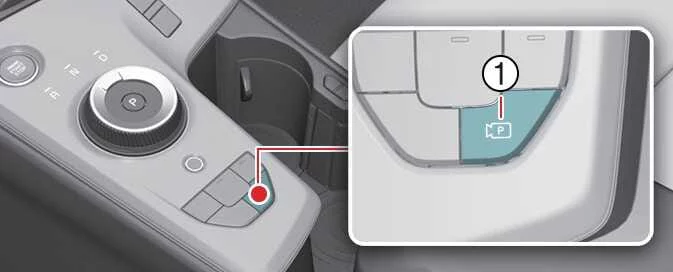
Press the Parking/View button (1) to switch on the Surround View Monitor and display the area around the Kia Sportage.
Press the button again to switch the monitor off.
Front View
 |
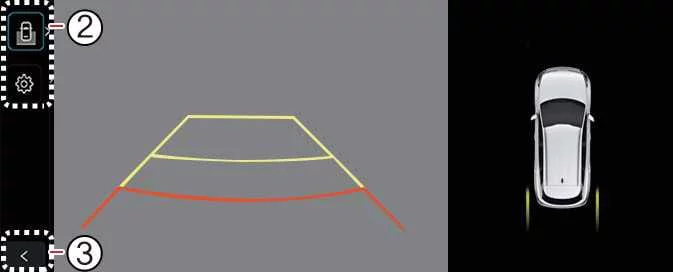 |
The front-view function displays the area ahead of the vehicle on the navigation system screen according to the selected view settings. It can help you check the space in front of the Kia Sportage while manoeuvring or driving.
Parking
While parking, the front view of the Surround View Monitor turns on under any of the following conditions:
- The gear is in P (Park), N (Neutral), or D (Drive), the vehicle is travelling below 10 km/h (6 mph), and the Parking/View button (1) is pressed.
- The gear is shifted from R (Reverse) to N (Neutral) or D (Drive).
- The automatic activation function for the Surround View Monitor is enabled.
Press the view switching button (2) on the Surround View Monitor to choose Top View, Front View, Side View, or Wide View.
While parking, the front view turns off under any of the following conditions:
- The gear is shifted to P (Park) or R (Reverse).
- The Parking/View button (1) is pressed.
- The back button (3) on the Surround View Monitor screen is pressed.
- The infotainment system power button (4) is pressed.
- The vehicle travels faster than 10 km/h (6 mph).
NOTE
When the front view is activated, the Surround View Monitor displays the view mode that was used most recently.
Driving
While driving, the front view of the Surround View Monitor can be activated under the following condition:
- The gear is in N (Neutral) or D (Drive), the vehicle is travelling faster than 10 km/h (6 mph), and the Parking/View button (1) is pressed.
Press the view switching button (2) on the Surround View Monitor to select the front view or wide view.
While driving, the front view turns off under any of the following conditions:
- The gear is shifted to P (Park) or R (Reverse).
- The Parking/View button (1) is pressed.
- The back button (3) on the Surround View Monitor screen is pressed.
- The infotainment system power button (4) is pressed.
NOTE
- When the front view is activated while driving, the Kia Sportage displays the view mode that was used most recently.
- If the rear view was activated while driving, it remains on even if the vehicle slows to below 10 km/h (6 mph).
- When the front view is activated while driving, the front top view and front side view are unavailable at all vehicle speeds.
 Surround View Monitor Operation
 Rear View
See also:
4WD ECU: Components and Components Location
Component Location
1. Crash pad2. Crash lower panel3. 4WD ECU
...
License Lamps: Repair procedures
Removal
1.
Disconnect the negative (-) battery terminal.
2.
Remove the lens (A) and license lamp (B) after loosening 2 screws.
Installation
1.
Install the bulb.
2.
Install the license ...
If the Engine Overheats
TIP
If the temperature gauge indicates that the engine is overheating, you may notice reduced power or a loud pinging or
knocking noise. These symptoms can indicate that the engine is too hot.
Coo ...
Categories
- Home
- Kia Sportage NQ5 (2022-2026) Owner's Manual
- Kia Sportage QL (2015-2019) Owner's Manual
- Kia Sportage QL (2015-2019) Service Manual
- Kia Sportage SL 2010-2016 Owner's Manual
- Kia Sportage SL 2010-2016 Service Manual
