
 Kia Sportage: Rear View Monitor settings
Warning Method
|
|
With the Kia Sportage switched on, open Setup > Vehicle > Driver Assistance > Warning Method in the infotainment system to adjust the available setting:
-
Parking Safety Priority: Lowers the volume of other audio sources while Rear View Monitor is active, making it easier to hear its alerts.
TIP
-
The Warning Method setting may also affect alerts from other driver assistance systems. Review the settings for each function as needed.
-
The selected Warning Method is retained after the vehicle is restarted.
-
Depending on the vehicle’s equipment and specifications, this setting may not be available.
Camera Settings
|
|
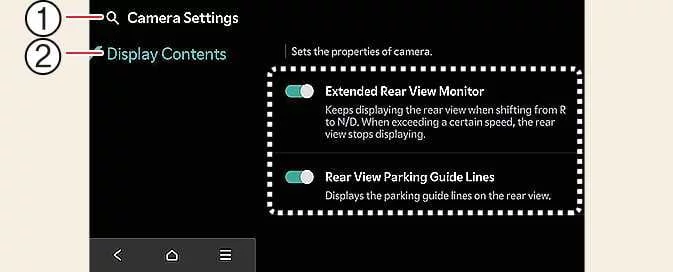
With the vehicle switched on, select the setup icon  on the screen, or
open Setup > Vehicle > Driver Assistance > Parking Safety > Camera Settings in the infotainment system.
Use this menu to adjust the Rear View Monitor options.
on the screen, or
open Setup > Vehicle > Driver Assistance > Parking Safety > Camera Settings in the infotainment system.
Use this menu to adjust the Rear View Monitor options.
Extended Rear View Monitor
When Extended Rear View Monitor is enabled, the rear camera image remains on the display after the gear is shifted from R (Reverse) to N (Neutral) or D (Drive).
Rear View Parking Guidance
When Rear View Parking Guidance is selected under Display Contents, the Rear View Parking Guidance and Top Rear View Parking Guidance lines appear on the monitor to help you judge the space behind the vehicle.
Display settings
-
Use Display settings to adjust the camera image brightness for day or night viewing and to change its contrast.
NOTE
-
Depending on the vehicle’s equipment and specifications, some settings may not be available.
-
The horizontal lines in the rear-view parking guidelines are based on an unladen vehicle. They indicate distances of approximately 0.5 m (20 in.), 1 m (40 in.) and 2.3 m (91 in.) from the vehicle.
-
The horizontal lines in the rear top-view guidelines are also based on an unladen vehicle. They indicate the tailgate opening distance and a distance of approximately 1.5 m (60 in.) from the vehicle.
 Rear View Monitor (RVM): (if equipped)
 Rear View Monitor operation
See also:
Passive Occupant Detection System (PODS): Repair procedures
Removal
1.
Disconnect the battery negative cable, and wait for at least three minutes before beginning work.
2.
Remove the front passenger seat assembly. (Refer to the Body group- Seat)
3.
...
Rear seat heater
The seat heater is provided to warm the rear seats during cold weather. With
the ignition switch in the ON position, push either of the switches to warm rear
seats.
During mild weather or under ...
Power Door Lock Actuators: Repair procedures
Inspection
Front Door Lock Actuator
1.
Remove the front door trim.
(Refer to the BD group - "Front door")
2.
Remove the front door module.
(Refer to the BD group - "Front door")
3.
Disc ...
Categories
- Home
- Kia Sportage NQ5 (2022-2026) Owner's Manual
- Kia Sportage QL (2015-2019) Owner's Manual
- Kia Sportage QL (2015-2019) Service Manual
- Kia Sportage SL 2010-2016 Owner's Manual
- Kia Sportage SL 2010-2016 Service Manual
