
 Kia Sportage: Rear View Monitor operation
Parking/View button
|
When the gear is in P (Park), press the Parking/View button (1) to switch the Rear View function on or off.
To display or hide the rear view while driving, press the Parking/View button (1) with the gear in D (Drive) or N (Neutral).
Rear view
|
|
Operating conditions
The Rear View function activates in either of these situations:
-
The gear is shifted to R (Reverse).
-
The Parking/View button (1) is pressed while the gear is in P (Park), N (Neutral) or D (Drive), and the vehicle is travelling below 10 km/h (6 mph).
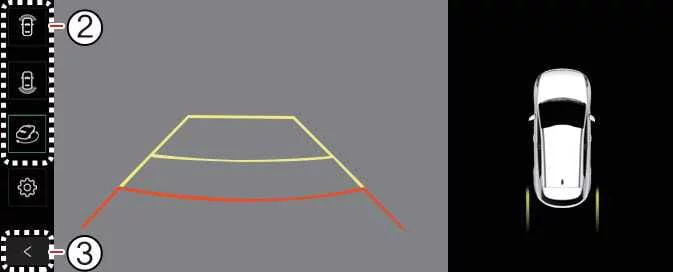
When Rear Top View is displayed, press the View switching button (2) to choose between rear top view, rear view and rear wide view.
Off conditions
While the vehicle is being parked, Rear View while driving switches off when any of the following occurs:
-
The gear is shifted to P (Park).
-
The Parking/View button (1) is pressed.
-
The back button (3) on the rear monitor screen is pressed.
-
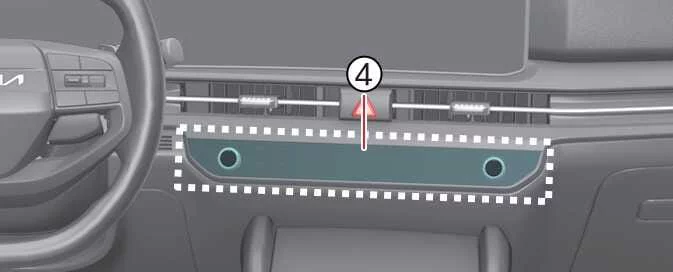
The infotainment system operation button (4) is pressed.
-
The gear is in N (Neutral) or D (Drive) and the vehicle exceeds 10 km/h (6 mph).
NOTE
Rear View remains on while the gear is in R (Reverse).
Extended Rear View Monitor
Extended Rear View Monitor keeps the rear camera image visible after shifting from R (Reverse) to N (Neutral) or D (Drive), helping you continue to see the area behind the Kia Sportage while parking.
Operating conditions
The rear camera view remains displayed when both of the following conditions are met:
-
The vehicle is travelling below 10 km/h (6 mph).
-
The gear has been shifted from R (Reverse) to N (Neutral) or D (Drive).
Off conditions
Extended Rear View Monitor switches off when any of the following conditions is met:
-
The gear is shifted to P (Park).
-
The Parking/View button (1) is pressed.
-
The back button (3) on the rear monitor screen is pressed.
-
The infotainment system operation button (4) is pressed.
-
The vehicle travels faster than 10 km/h (6 mph).
Rear top view
|
|
|
|
|
Rear Top View provides a bird’s-eye-style image of the area behind the vehicle. Use the view to judge the distance between the rear of the Kia Sportage and nearby vehicles or objects while parking.
Press the Rear Top View button (2) to display this camera view.
Rear View While Driving
The Rear View While Driving function displays the area behind the Kia Sportage on the infotainment monitor while you drive. It can help you check rearward traffic and surroundings, but it does not replace direct observation or the use of the mirrors.
Operating conditions
Rear View While Driving turns on under the following condition:
- The Parking/View button (1) is pressed while the gear is in N (Neutral) or D (Drive) and the vehicle is travelling faster than 10 km/h (6 mph).
Use the view switching button (2) on the rear monitor to select either the rear view or the rear wide view.
Conditions for turning off
Rear View While Driving turns off under any of the following conditions:
- The gear is shifted to P (Park).
- The Parking/View button (1) is pressed.
- The back button (3) on the rear monitor screen is pressed.
- The infotainment system operation button (4) is pressed.
NOTE
- In any view, the video remains on while the vehicle is in R (Reverse).
- When the rear monitor is activated, it displays the view mode that was used most recently.
- Rear parking guidelines appear in the rear view and rear top view. To enable them, select Setup > Vehicle > Driver Assistance > Parking Safety > Camera Settings > Display Information > Rear Parking Guidelines in the infotainment system settings. These guidelines are not shown in Rear View While Driving.
- After Rear View While Driving has turned on, it remains active even if the vehicle slows to below 10 km/h (6 mph).
- When Rear View While Driving is active, the rear top view is unavailable.
 Rear View Monitor settings
 Rear View Monitor Malfunction and Limitations
See also:
Bulb wattage
...
ESC OFF Switch: Repair procedures
Inspection
1.
Turn ignition switch OFF and disconnect the negative (-) battery cable.
2.
Remove the crash pad side switch assembly.
3.
Check the continuity between the switch terminals as ...
Exterior care
General exterior care
When using any chemical cleaner or polish on your Kia Sportage, follow the product label carefully. Read all warnings
and cautions before use, and apply the product only as d ...
Categories
- Home
- Kia Sportage NQ5 (2022-2026) Owner's Manual
- Kia Sportage QL (2015-2019) Owner's Manual
- Kia Sportage QL (2015-2019) Service Manual
- Kia Sportage SL 2010-2016 Owner's Manual
- Kia Sportage SL 2010-2016 Service Manual
