
 Kia Sportage: How to Delete a Digital Key (Smartphone)
Before deleting a smartphone digital key, switch on the Kia Sportage with the smart key and keep the smart key inside the vehicle until the deletion process is complete.
-
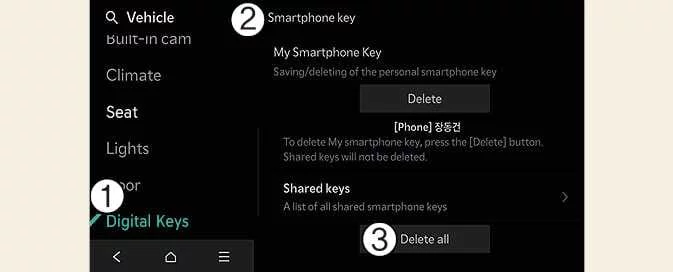
Delete All Digital Keys (Smartphone)
-
Digital Keys
-
Smartphone Key
-
Delete All
With the vehicle switched on, use the infotainment system to select Setup > Vehicle > Digital Keys > Smartphone Key > Delete All.
-
This removes both the owner’s digital key and all shared digital keys.
-
If no digital key is registered, Delete All is unavailable.
-
-
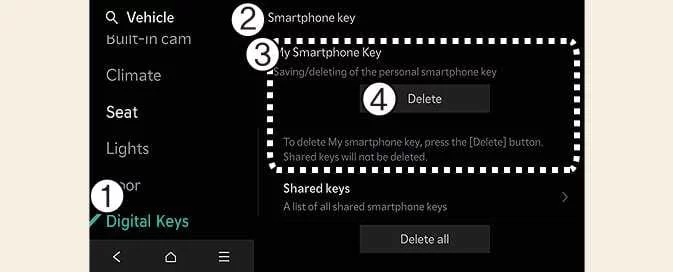
Delete the Owner’s Digital Key
-
Digital Keys
-
Smartphone Key
-
My Smartphone Key
-
Delete
To replace only the owner’s smartphone key while keeping shared keys, delete the owner’s smartphone key without selecting Delete All. You can then save the replacement key.
With the vehicle switched on, select Setup > Vehicle > Digital Keys > Smartphone Key > My Smartphone Key > Delete on the infotainment system.
-
After My Smartphone Key is deleted, you can register a new smartphone.
-
Delete Shared Keys
On the infotainment system, select Setup > Vehicle > Digital Keys > Smartphone Key > Shared Keys > [Group] > Delete All.
Digital keys other than My Smartphone Key are grouped and shown as Shared Keys. If the same account is signed in on multiple smartphones, those keys appear under the same group.
You can delete shared keys one group at a time by selecting the relevant [Group].
NOTE
-
Deleting a smartphone digital key in the Kia Sportage also deletes the corresponding digital key saved on the smartphone.
-
Deleting the digital key from the smartphone also removes the corresponding key saved in the vehicle.
-
Deleting the Kia App or Kia Connect app from a smartphone does not delete the digital key.
-
You can activate or deactivate the digital key through the Kia App, Kia Connect app or the wallet app provided by the smartphone manufacturer.
TIP
The infotainment system menus may change after software updates. For the latest instructions, refer to the manual available in the infotainment system and the quick reference guide.
 How to Use Digital Key 2 (Smartphone)
 Digital Key 2 (Card Key)
See also:
Special Service Tools
Special Service Tools
Tool(Number and Name)IllustrationUseDeployment tool0957A-34100AAirbag deployment tool.Deployment adapter0957A-38510Use with deployment tool.(DAB)Deployment adapter0957A-3Q10 ...
Repair procedures
Inspection
[System Inspection]
1.
Disconnect the vapor hose from the intake manifold and connect a vacuum pump to the nipple on the intake manifold.
· At Cold Engine [Engine Coolant Temperatu ...
Before Using the Bluetooth® Handsfree
What is Bluetooth® ?
Bluetooth® refers to a short-distance wireless networking technology which
uses a 2.4GHz ~ 2.48GHz frequency to connect various devices within a certain
distance.
Su ...
Categories
- Home
- Kia Sportage NQ5 (2022-2026) Owner's Manual
- Kia Sportage QL (2015-2019) Owner's Manual
- Kia Sportage QL (2015-2019) Service Manual
- Kia Sportage SL 2010-2016 Owner's Manual
- Kia Sportage SL 2010-2016 Service Manual
