
 Kia Sportage: Storage compartment
Centre console storage/glove box
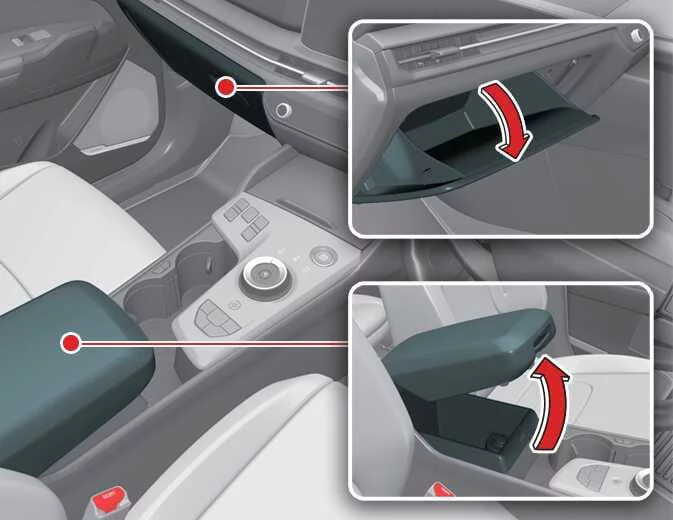 |
Operation
-
Lift the lever to open the centre console storage compartment.
-
Pull the handle to open the glove box.
WARNING
-
Flammable materials
Do not store flammable or explosive items in the vehicle, including glasses, gas lighters, portable batteries, canned drinks, aerosol cans, propane cylinders or cosmetic tubes. If exposed to high temperatures for an extended period, these items may catch fire or explode.
-
Glove box
Keep the glove box closed while driving to reduce the risk of injury in a collision or sudden stop.
CAUTION
-
Do not leave valuables in the storage compartments, as this may invite theft.
-
Keep storage compartment covers closed while driving. Do not overfill a compartment or force its cover shut; make sure it closes securely.
-
Do not store food in the glove box for long periods.
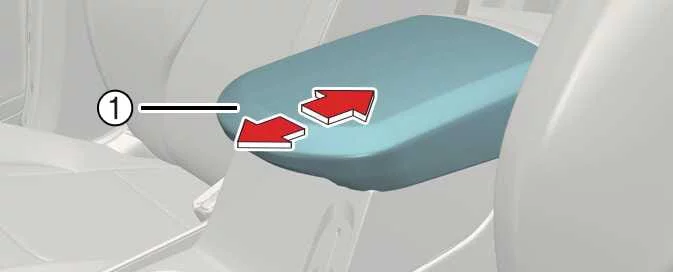
Sliding armrest
 |
Operation
-
Grip the front section of the armrest (1) and pull it forward.
-
To slide it rearward, push it back with the palm of your hand.
WARNING
When sliding the armrest rearward, do not hold its front section (1). Your fingers could become trapped.
Luggage net holder
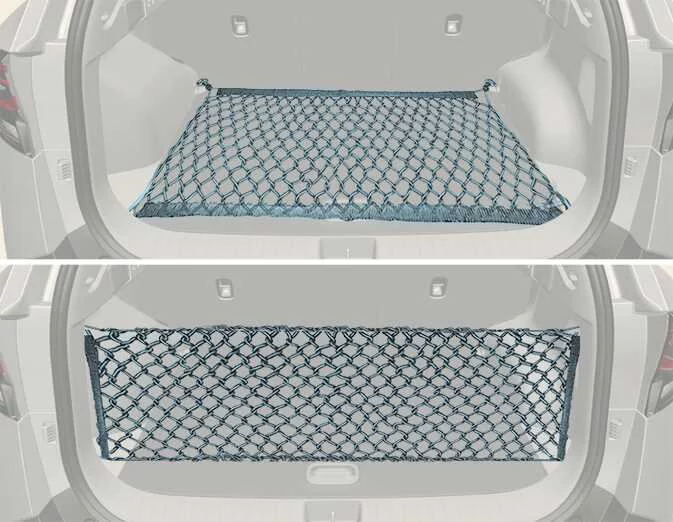 |
Four holders are provided in the Kia Sportage cargo area. If equipped, the luggage net can be attached in either of two configurations.
WARNING
To avoid eye injury, do not overstretch the luggage net. Keep your face and body clear of its recoil path, and do not use the net if its strap shows signs of wear or damage.
CAUTION
Take care when carrying fragile or bulky items in the luggage compartment to prevent damage to the cargo or the vehicle.
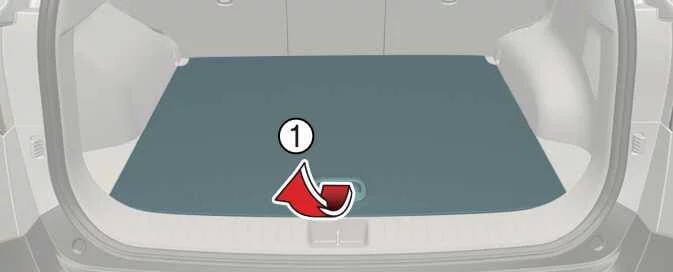
Luggage board: (if equipped)
 |
Operation
-
Grip the handle (1) on top of the cover and lift the board.
-
Fold the rear section of the luggage board forward.
-
Lift the luggage board forward and up.
NOTE
-
If the luggage compartment contains a temporary or full-size spare tyre, the reflector triangle can be stored there.
-
If the luggage compartment is equipped with a TMK, the storage box can hold the first aid kit, tools and other items for convenient access.
Cargo security screen: (if equipped)
Installing cargo security screen
 |
|
Operation
-
Hold the handle (1) and pull the cargo security screen towards the rear of the Kia Sportage.
-
Fit the guide pin into the guide (2) to secure the screen in place.
WARNING
-
Do not place items on the cargo security screen. During sudden braking or a collision, objects may shift and injure vehicle occupants.
-
Never allow anyone to travel in the luggage compartment. It is intended for carrying luggage only.
-
Distribute cargo to keep the vehicle balanced, and place its weight as far forward as possible.
NOTE
-
Do not load luggage onto the cargo security screen, as this may damage or deform it.
-
Use the handle in the centre when pulling out the screen. This helps prevent the guide pin from slipping out of its guide.
-
If the screen does not retract automatically, it may not have been pulled out fully. Pull it all the way out, then release it.
Removing cargo security screen
 |
 |
Operation
-
Push the guide pin in the direction shown to release it.
-
Pull the cargo security screen out of its guides.
-
Open the luggage board (1) and side tray cover (2), then place the screen in the tray (3). This storage location applies when the vehicle has a petrol engine and is equipped with either a mini temporary spare tyre or a TMK in the luggage compartment.
 Windscreen defrosting and defogging
 Interior features
See also:
Oil Seal: Repair procedures
Replacement
[Right side]
1.
Remove the driveshaft assembly. (RH side)
(Refer to "Front Driveshaft" in Driveshaft and axle)
2.
Remove the dust cover (A).
3.
Remove the oil seal (A, B).
...
Intelligent Speed Limit Assist operation. Warnings and control
Warnings and control
Intelligent Speed Limit Assist (ISLA) presents information and alerts in stages, depending on the driving situation:
Displaying the speed limit
Warning ...
Overdrive Clutch Control Solenoid Valve(OD/C_VFS): Schematic Diagrams
Circuit Diagram
...
Categories
- Home
- Kia Sportage NQ5 (2022-2026) Owner's Manual
- Kia Sportage QL (2015-2019) Owner's Manual
- Kia Sportage QL (2015-2019) Service Manual
- Kia Sportage SL 2010-2016 Owner's Manual
- Kia Sportage SL 2010-2016 Service Manual
