
 Kia Sportage: Rear camera display
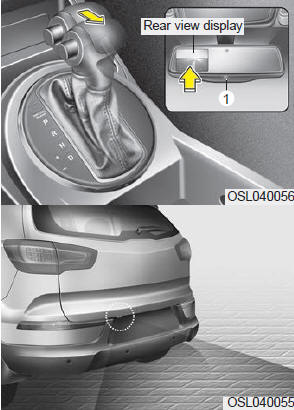
The Rear camera display will activate when the back up light is ON with the ignition switch ON and the shift lever in the R (Reverse) position.
This system is a supplemental system that shows behind the vehicle through the rearview display mirror while backing-up.
The Rear-camera display may be turned off by pressing the ON/OFF button (1) when the Rear-camera display is activated.
To turn the camera on again, press the ON/OFF button again when the ignition switch is on and the shift lever in R (Reverse). Also, the camera will turn on automatically whenever the ignition switch is turned off and on again.
Never rely solely on the Rear Camera Display when backing.
- The Rear Camera Display and Back up Warning System are not substitutes for proper and safe backing up procedures. Always drive safely and use caution when backing up. The Rear-Camera Display and Back up Warning System may not detect every object behind the vehicle.
- Always keep the camera lens clean. If lens is covered with foreign matter, the camera may not operate normally.
Detailed information for Rear-camera display on the navigation system is described in a separately supplied manual.
 Self-diagnosis
If you don’t hear an audible warning sound or if the buzzer sounds intermittently
when shifting the gear to the R (Reverse) position, this may indicate a malfunction
in the Back up warning syste ...
 Hazard warning flasher
The hazard warning flasher should be used whenever you find it necessary to stop
the vehicle in a hazardous location. When you must make such an emergency stop,
always pull off the road as far a ...
Other Information:
Fuel Pressure Control Valve: Description and Operation
Description
Fuel Pressure Regulator Valve is installed on the high
pressure fuel pump and controls fuel flow flowing into the injectors in
accordance with the ECM signal calculated based on var ...
Master Cylinder: Components and Components Location
Components
1. Reservoir cap2. Reservoir3. Grommet4. Master cylinder
...
Categories
- Home
- Kia Sportage QL (2015-2019) Owners Manual
- Kia Sportage QL (2015-2019) Service Manual
- Kia Sportage SL 2010-2016 Owners Manual
- Kia Sportage SL 2010-2016 Service Manual
