
 Kia Sportage: Using the Smart Key (If Equipped)
 |
|
Operation
-
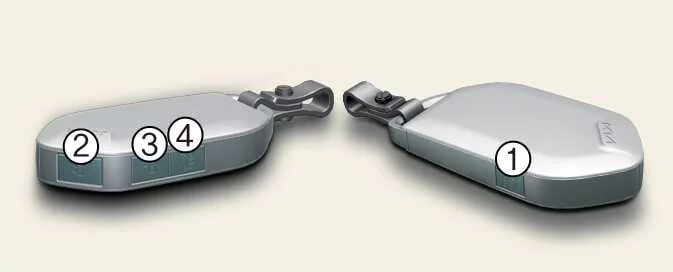
Press the button for the function you want to use.
When the Smart Key May Not Operate
-
The smart key is near a radio transmitter, such as one at a radio station or airport, that may interfere with its signal.
-
The smart key is close to a mobile two-way radio system or a mobile phone.
-
Another vehicle’s smart key is being operated near your Kia Sportage.
TIP
-
After you press the lock or unlock button (2 or 3), the hazard warning lights flash once and the chime sounds once to confirm that the doors are locked.
-
After you press the unlock button (3), the doors lock automatically again if you do not open a door within 30 seconds.
-
Depending on the vehicle’s equipment, press and hold the tailgate unlock/open button (4) to unlock or open the tailgate. After the tailgate has been opened and closed, it locks automatically.
-
If a door, the bonnet or the tailgate is open, the hazard warning lights do not flash.
NOTE
-
If you lose the smart key, you will not be able to start the vehicle. If necessary, have the Kia Sportage towed and contact a professional workshop. Kia recommends using an authorised Kia dealer or service partner.
-
A maximum of two smart keys can be registered to one vehicle. If a smart key is lost, Kia recommends contacting an authorised Kia dealer or service partner.
-
If the smart key does not operate correctly, use the mechanical key to unlock or lock the door. If the problem continues, Kia recommends contacting an authorised Kia dealer or service partner.
-
If the smart key has not been moved for some time, its detection function may pause. Lift or move the key to reactivate detection.
Starting the Vehicle Remotely (If Equipped)
Operation
-
Stand within 10 m (32 ft.) of the vehicle and press the lock button (2) to lock the doors.
-
Within four seconds of locking the doors, press and hold the remote start button (1) for more than two seconds.
-
To switch off the vehicle, press the remote start button (1) again.
TIP
If you do not take any further action to operate or drive the vehicle, it switches off 10 minutes after being started remotely.
Mechanical Key
 |
|
Operation
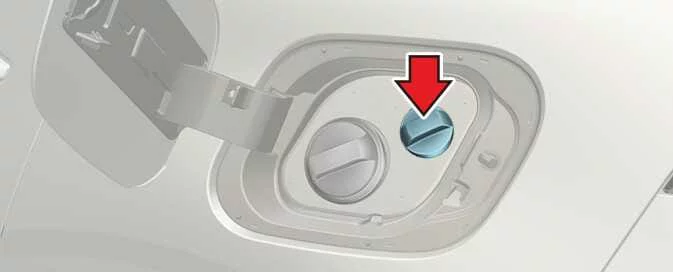
Pull the protective cover (1) away from the mechanical key (2) to expose the key.
 Using the Remote Key (If Equipped)
 Immobiliser System
See also:
Tight corner brake effect
Tight corner brake effect is a unique characteristic of four-wheel drive vehicles
caused by the difference in tire rotation at the four wheels and the zero-degree
alignment of the front wheels and ...
Rear View Monitor Malfunction and Limitations
Rear View Monitor Malfunction
If the Rear View Monitor malfunctions, its display may appear green, blue, or black. If the system does not operate
correctly, the screen flickers, or the camera imag ...
3 Point rear center belt
To fasten the rear center belt
1.Extract the tongue plate from the hole on the belt assembly cover and slowly
pull the tongue plates out from the retractor.
2.Insert the tongue plate (A) into ...
Categories
- Home
- Kia Sportage NQ5 (2022-2026) Owner's Manual
- Kia Sportage QL (2015-2019) Owner's Manual
- Kia Sportage QL (2015-2019) Service Manual
- Kia Sportage SL 2010-2016 Owner's Manual
- Kia Sportage SL 2010-2016 Service Manual
